
Share This Article
Finding a genuine OnlyFans creator takes less time than most people assume, but only if you follow a fixed routine instead of scrolling and hoping.

Impersonation is common because the platform rewards attention directly.
The checks below rely on information the platform already shows you. None of them require special tools, paid services, or contact with the creator.
Why fake OnlyFans pages exist and who they target
A fake page exists for one of two reasons: to take money, or to take attention and resell it. Both motives produce the same surface behaviour, which is why the same signals keep showing up.
Payment phishing is the most direct risk. A fake profile asks you to move the conversation to another app, then sends a payment link that has nothing to do with the platform.
Wasted tips are the quieter cost. A page that looks active may be reposting stolen media with no person behind it, so every tip and pay-per-view unlock goes nowhere.
Mistakes to avoid
Subscribing before checking whether the bio, links, and posting history agree with each other. Moving a conversation to another app at the request of an account you have not verified.

Profile signals that separate real from fake
The profile itself carries most of the evidence. Read it in a fixed order so you compare the same fields on every page.
Start with the verification badge, then the bio, then the linked accounts. Badges are not available to everyone, so their absence means nothing on its own.
Profile fields to check first
- The verification badge and whether the account name matches the name used elsewhere.
- The bio’s internal consistency: location, age, and stated interests should not contradict each other.
- Linked social accounts, and whether those accounts point back to the same page.
- The join date, which should be older than the most recent wave of posts.
- The subscription price, which on a paid page sits between $4.99 and $49.99, with most pages landing between $4.99 and $15.
A genuine creator usually links at least one account they control. A fake page either links nothing or links an account created in the same week as the page itself.

Posting history and activity patterns
Post history is harder to fake than a bio because it accumulates over time. Scroll back through the feed and read the dates rather than the content.
Consistent gaps and a long tail of older posts suggest a real posting rhythm. A wall of media uploaded in two days, followed by silence, suggests a page built to be abandoned or sold on.
Red flags versus healthy signals
- Red flag: the entire feed was posted within a few days, with no older material.
- Healthy signal: posting spread across months, with natural gaps.
- Red flag: identical captions repeated across many posts.
- Healthy signal: captions that reference recent events or reply to earlier messages.
- Red flag: sudden price changes that reset auto-renew with no explanation.
- Healthy signal: a stable subscription price in the $5 to $10 range for a long period.
Note that a price rise stops auto-renew on an existing subscription, and access continues only until the current paid period ends. Impersonators sometimes exploit that gap by raising the price and hoping subscribers do not notice the change.
Practical tip: before you subscribe, open the page in a private browser window. Logged-out views show you the public bio, price, and post count without adding your account to the follower list, so you can check twice before committing.

Reverse image and cross-platform checks
Images travel between platforms faster than any other signal. A reverse image search on two or three profile photos will show whether the same pictures appear under a different name.
Then check the username across other platforms. A real creator usually uses a similar handle in more than one place, and those accounts tend to be older than the page you are reviewing.
Cross-checking also reveals the direction of the link. A genuine profile links outward to accounts the creator controls, and those accounts link back.
What each check tells you
- Reverse image search returns the same photo under multiple unrelated names: reposted media.
- Reverse image search returns no matches at all: the photos are new, which proves nothing by itself.
- Username appears on two or more platforms with consistent details: a stronger signal.
- Username appears only on the page you are reviewing: needs further checks.
- Linked account was created after the page: a mismatch worth weighing.
Run the checks in this order and stop as soon as one result contradicts the others. Speed matters more than exhaustiveness here.

A comparison table of real versus fake page traits
Side-by-side comparison makes the pattern easier to spot than any single test. The table below sets out how the same fields usually look on a verified page and on an impersonator.
| Field | Verified page | Impersonator |
|---|---|---|
| Bio | Specific, consistent, mentions checkable details | Generic, copied wording, contradictions between fields |
| Media count | Grows steadily over months | Large batch uploaded in a short window |
| Follower behaviour | Slow, steady growth with replies in comments | Sudden spikes, little interaction, no replies |
| Follower behaviour | Subscribers return across multiple posts | One-off follows with no repeat engagement |
| Linked accounts | Point to profiles the creator also controls | Missing, dead, or created in the same week |
The follower rows matter more than the headline number. Engagement that repeats over time is difficult to manufacture, while a follower count on its own is not. For a starting point, free onlyfans australia collects free pages.

Red flags in messages and DMs
Most impersonation attempts only become obvious after you follow, when messages start arriving. The wording is repetitive across accounts because the same scripts get reused.
Pressure is the defining feature. A genuine creator does not need you to decide within minutes, and does not need you to move off the platform to complete a payment.
Common scam phrases and tactics
- Requests to continue the conversation on another messaging app.
- Claims that a limited offer expires within minutes or hours.
- Instructions to pay through an external link rather than the platform’s checkout.
- Requests for gift cards, bank details, or a screenshot of your payment app.
- Messages that ask you to confirm your login details for verification.
- Repeated reminders that you will lose access unless you act immediately.
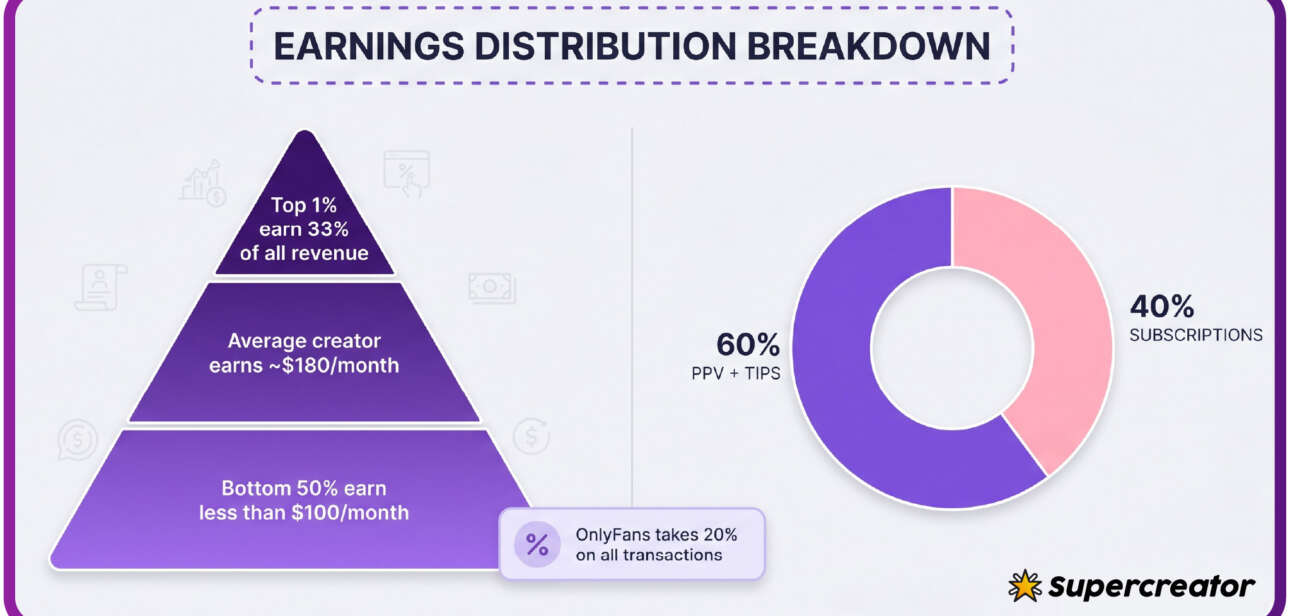
Note that the platform takes a 20% fee on subscriptions, tips, and pay-per-view, and the creator keeps 80%. That fee is why a request to pay outside the platform is never in a real creator’s interest.
A five-minute verification checklist
This is the routine in the order that saves the most time. Run it on any page you are considering, and keep the total under five minutes.
- Read the bio and check that location, age, and stated interests do not contradict each other.
- Check the verification badge and the join date against the most recent posts.
- Scroll to the bottom of the feed and confirm that posting spans more than a few days.
- Reverse image search two profile photos and compare the results.
- Search the username on two other platforms and check whether the details match.
- Confirm the subscription price sits within the $4.99 to $49.99 range, with the typical paid page between $4.99 and $15.
- Check whether the page is free, which means the price is set to $0 and income comes from pay-per-view messages and tips.
- Read any message you have received and look for pressure or off-platform payment requests.
For a wider pool of pages to test this routine against, a curated list of free onlyfans australia pages gives you several profiles to compare side by side. Comparison is the fastest way to calibrate what a normal page looks like.
Ranking sites exist because the platform has no built-in discovery feed or directory. That absence is also why fake pages can sit unnoticed until someone reports them.
When to walk away and how to report
Walk away as soon as two checks disagree. You do not need certainty, and you do not owe an account the benefit of the doubt.
If you have already subscribed, cancel before the next renewal and note that a price change on the creator’s side ends auto-renew, with access lasting until the current paid period finishes. Then report the account through the platform’s reporting flow.
Reporting takes a minute and protects the next person who checks the same page. Include the specific signals you found, such as mismatched linked accounts or a batch of posts uploaded in a single day. BestOnlyFans refreshes its rankings every month.
FAQ
Can a page be fake even if it has a verification badge?
Yes. A badge confirms the account was reviewed at a point in time, not that the person posting today is the same person, so it should be one signal among several rather than the final word.
Is a free page more likely to be fake?
Not necessarily. A free page sets its price to $0 and earns through pay-per-view messages and tips, which is a normal model, so weigh the bio, posting history, and linked accounts instead of the price alone.
What should I do if I already sent a tip to a fake page?
Stop all further payments, cancel any subscription before the next renewal, and report the account with the specific signals you found. Payments made outside the platform are usually unrecoverable.
How often should I re-run these checks?
Re-check a page whenever its behaviour changes, such as a sudden price increase, a gap in posting, or new messages that ask you to move to another app, since accounts can be sold or taken over.
| Check | Time needed | What it proves |
|---|---|---|
| Bio consistency | 30 seconds | Whether the stated identity holds together |
| Post history scan | 60 seconds | Whether posting spans real time |
| Reverse image search | 90 seconds | Whether photos appear under other names |
| Cross-platform username search | 60 seconds | Whether the person exists elsewhere |
As subscriber numbers grew, so did the number of pages imitating popular accounts, which is why a fixed routine beats a quick glance. BestOnlyFans readers who run the checklist above tend to catch mismatches before any money moves.
The whole method costs five minutes. BestOnlyFans recommends treating it as a habit rather than a one-off, because a page that looks clean today can change hands tomorrow.